Between the RAM-pocalypse pushing prices skyward and convenience, buying a new desktop PC isn’t in the cards, so keeping my laptop as a main PC is a good decision. Plugging all my peripherals in when I get home each day isn’t a great experience, so a USB dock is what I need – and Kensington has just the ticket.
The Kensington SD5900T EQ Thunderbolt 4 Quad 4K Hybrid Dock has a lot to offer, with 16 ports in total giving you multiple HDMI, Display Port and USB-C video out options and enough USB ports to allow you to leave peripherals plugged in and easily connect when you return.
At $599.95 (or less if you look around) the dock falls on the more premium side of what’s on offer, but after wearing out several of the cheaper USB docks and finding they don’t really meet my needs, it’s over to Kingston.
The box contains all you need to get going – and it’s not much, but it is enough.
There’s the dock itself, a nice USB-C cable made with a nice heavy gauge wire, and it’s powered by a DC charger with a barrel style connector that plugs in at the rear of the dock.
The charger uses a clover leaf style power cable to connect, which is supplied, and it supplies up to 149 Watts of power to the dock, which is distributed over the ports (with one supporting 96W alone).
There’s also some paperwork of course, including a brief setup guide (which can also be found online), and a safety information sheet.
The dock itself looks simple. The unit itself is fairly compact at just 23cm long and under 9cm wide, and it has some heft to it weighing in at just over 600 grams.
The additional weight stops the dock sliding around the desk, or being pulled by cables hanging from the desk. Instead, it sits ready to go.
It’s only available in one colour, which Kensington calls ‘Midnight Blue’ which is a sort of dark grey/black that has an almost blue/green hue in certain lights. The unit itself is mostly made from plastic that encapsulates the entire unit and it feels pretty good.
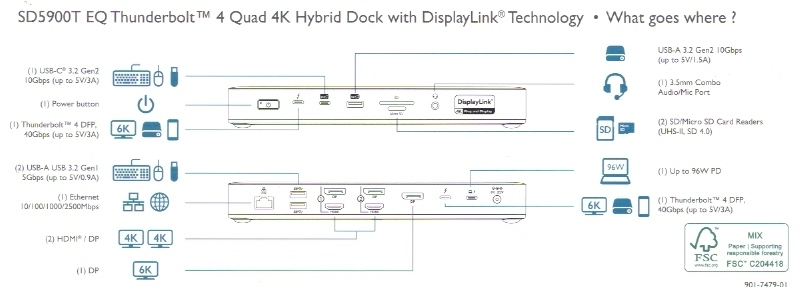
The dock contains an array of USB Type-A and USB Type-C ports split between the front and rear – with a couple of those designated as Thunderbolt4 ports. There’s also multiple video out options with up to four video out streams through HDMI, DisplayPort or USB-C.
There’s also a 2.5Gbps Ethernet connection for improved connectivity, as well as a Micro SD and full-sized SD card readers to make transferring data even easier, and faster.
The full list of 16 ports includes:
The base of the unit includes rubberised feet so it won’t move around too much on your desk, but you can also mount it using the two screw holes underneath, and Kensingtons (K34050) Docking Station Mounting bracket.
Finally, you can secure the dock to a desk using the ports on the side, with the manual recommending the Kensington MicroSaver, or NanoSaver Laptop locks.
Surprisingly, there’s actually software for the dock – and it’s actually good.
Kensington’s ‘Dockworks’ application, and the DisplayLink app are available, though only the DisplayLink app is available for Windows and Mac OS (and ChromeOS, Android and Ubuntu). Dockworks is exclusively Windows.
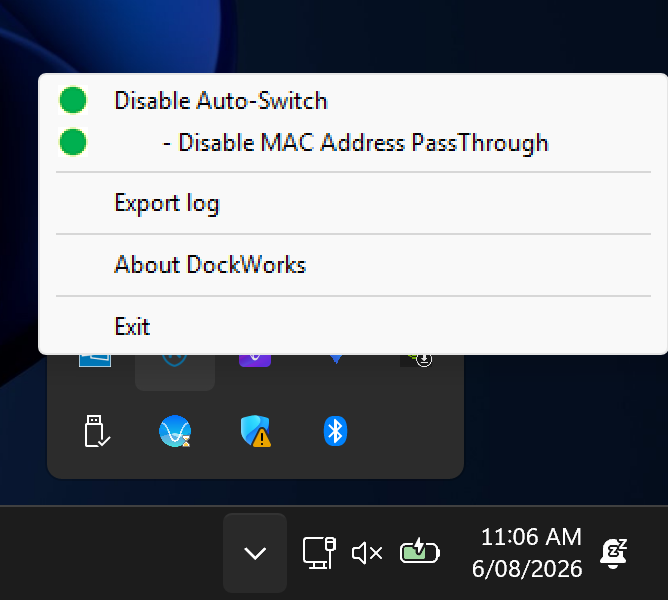
Dockworks runs as a utility in your system tray, and basically does its thing.
It’s designed to automatically switch your device from Wifi to LAN connected as soon as you plug in, which if you’re using a 2.5Gb network port is essential to maintain speed.
The app can also manage MAC Address passthrough, which prevents the next user of the dock using the previous MAC ID – important for networks and stopping clashes, and security incidents.
Dockworks also has tools for IT Admins, letting them access the dock for diagnostic logs, as well as Device Connection Monitoring which gives them visibility of what is connected to each user’s docking station.
From Synaptics, the DisplayLink app also runs as a headless utility in your system tray.
My laptop generally supports multiple video out streams, so it simply links to the Windows Display and Audio options.
DisplayLink lets you do a little more with your laptop if you’re restricted to a single display out on your laptop.
I haven’t found this with my laptop, but it’s apparently an issue with some base Apple M1, M2, or M3 MacBooks which normally support only one external display. The DisplayLink apps lets you run multiple 4K monitors (like triple or quad setups) through the Kensington Dock.
Setup is simple. But there are a couple of things to consider when setting it up.
First, the power and your laptop. The upstream port can deliver 96W of power, which is great for most devices, however anything running a higher-end GPU will likely need more.
My Laptop uses a 140W power supply, so it gets a ‘low power’ warning when booting up, and of course it can’t hit the ‘Performance/Turbo’ mode I need for games to run at their optimum speed.
Other ports don’t deliver quite the power you need for charging, so it’s just something to bear in mind.
The only other real ‘funny’ part of the setup is deciding between HDMI and Display Port using the rear ports as it will only use one of those ports each – but generally it’s pretty straight forward and the manual has done a wonderful job of explaining the setup.
The rest of the ports and the microSD and SD Card slots are straight forward, with the card slots listed as SD4.0/UHS-II – which can transfer data at 312Mbps.
As far as docks go, the Kensington SD5900T EQ Thunderbolt 4 Quad 4K Hybrid Dock is great.
It’s large enough to look good on a desk with all your peripherals plugged in, yet not too bulky that it takes up too much space on the desk.
There’s enough ports and video out options to keep anyone happy, and for Mac users the DisplayLink software will add some versatility to your display out options.
It’s not the cheapest option out there, but it does seem more reliable than other options I’ve tried and comes with a 3-Year limited warranty for peace of mind.
If you want to check it out further, you can head over to the Kensington website.
Daniel has been talking about, learning about and using tech since he was able to toggle switches and push buttons. If it flashes, turns on or off or connects he wants to use it, talk about it and learn more about it. Like this article? Buy me a coffee!
It's been a long time coming, but Ultrahuman today launched its latest smart ring, the…
Two rival magicians in Victorian London, once friends, become bitter enemies after a trick gone…
We all have a snack or three at our desks at some point in our…
There was certainly a lot of hype leading up to the announcement of this device,…
Reddit is in court, challenging Australia's Social Media Minimum Age legislation - how will that…
Thermomix today unveiled the Ovana 360, an advanced outdoor pizza oven with rotating stone technology…